

On November 10, 2020, the MacBook Pro M1 was released as a 13-inch model (there is no 16-inch model as of now) and is incredibly fast when it comes to demanding tasks. This year in 2021, on 26 October, the M1 Pro and Pro Max were released, with a standard screen size of 16-inch.
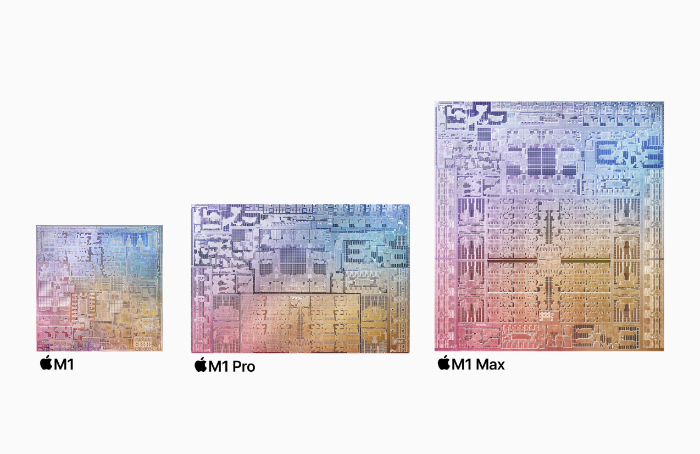
The M1 at standard has an 8-core CPU and an 8-core GPU as well as 16-cores for the neural engine, while the M1 Pro has an 8-core CPU and a 14-core GPU with 16-cores for the neural engine. As for the M1 Max, it has a 10-core CPU, a 32-core GPU, and a 16-core neural engine.
Memory
The M1 has a standard of 8GB of unified memory and can go up to 16GB. The M1 Pro has a standard of 16GB of unified memory and can go up to 32GB of memory. As for the M1 Max, it has a standard of 32GB of unified memory and can go up to a high 64GB of memory.
Storage
The M1 has a minimum of 256GB of storage, while the maximum can reach up to 2TB. The M1 Pro has a minimum of 512GB of storage, and the maximum can reach up to 8TB. The M1 Max is the same with 512GB at a minimum and 8TB at maximum.
Display
There’s a difference here. The M1 Pro and Max with their new ProMotion display’s allow a 120hz feeling, which defeats the M1 with a standard 60hz display. Disregarding that, the M1 at 13 inches has a 2560 x 1600 display at 227 PPI. The M1 Pro/Max has a display of 14-inches has a resolution of 3024 x 1964 at 254 PPI. The 16-inch version has a resolution of 3456×2234 at 254 PPI. The brightness M1 Pro / Max for the 14-inch can go up to 1600 nits, while the 16-inch can go up to 1600 nits as well. The fixed refresh rates are 47.95Hz, 48.00Hz, 50.00Hz, 59.94Hz, 60.00Hz.
Battery
According to Apple, for the M1 Pro / Max (14-inch), the battery specs are:
- Up to 17 hours of Apple TV app movie playback
- Up to 11 hours wireless web
- 70-watt-hour lithium-polymer battery2
For the 16-inch its:
- Up to 21 hours of Apple TV app movie playback
- Up to 14 hours wireless web
- 100-watt-hour lithium-polymer battery2
For the M1 13-inch, the specs are:
- Up to 17 hours wireless web
- Up to 20 hours of Apple TV app movie playback
- Built-in 58.2-watt-hour lithium-polymer battery
As for the charger, the M1 has a 61 W USB-C Power Adapter that can charge the MacBook to 100% in 2 hours. For the M1 Pro, it has a 67W USB-C Power Adapter (included with M1 Pro with 8-core CPU) or a 96W USB-C Power Adapter (included with M1 Pro with 10-core CPU or M1 Max, configurable with M1 Pro with 8-core CPU). And lastly, the M1 Max has a 140W USB-C Power Adapter that unlocks fast-charging potential.
Camera
The camera on the M1 sports a 720p Facetime camera, while the M1 Pro/Max have a 1080p Facetime camera that beforehand had not been updated for quite some time.
Audio
The M1 MacBook Pro has:
- Stereo speakers with high dynamic range
- Wide stereo sound
- Support for Dolby Atmos playback
- Studio-quality three-mic array with high signal-to-noise ratio and directional beamforming
- 3.5 mm headphone jack
Though the sounds that come from it are nice, nothing beats the sound on the M1 Pro/Max (14-inch) that has:
- High-fidelity six-speaker sound system with force-cancelling woofers
- Support for spatial audio when playing music or video with Dolby Atmos on built-in speakers
- Spatial audio with dynamic head tracking when using AirPods (3rd generation), AirPods Pro, and AirPods Max
- Studio-quality three-mic array with high signal-to-noise ratio and directional beamforming
- 3.5 mm headphone jack with advanced support for high-impedance headphones
And on the 16-inch:
High-fidelity six-speaker sound system with force-cancelling woofers
- Wide stereo sound
- Support for spatial audio when playing music or video with Dolby Atmos on built-in speakers
- Spatial audio with dynamic head tracking when using AirPods (3rd generation), AirPods Pro, and AirPods Max
- Studio-quality three-mic array with high signal-to-noise ratio and directional beamforming
- 3.5 mm headphone jack with advanced support for high-impedance headphones
Video Support
The M1 has support for one external display with up to 6K resolution at 60Hz at over a million colours, while the M1 Pro supports up to two external displays with up to 6K resolution at 60Hz at over a billion colours. Lastly, the M1 Max supports up to three external displays with up to 6K resolution and one external display with up to 4K
resolution at 60Hz at over a billion colours. As for the HDMI on the Pro/Max chips, they both only have support for one display with up to 4K resolution at 60Hz.
Wireless Network
All of the computers support Wi-Fi 6 and BlueTooth 5.0, and they all support IEEE 802.11a/b/g/n/ac.
Expansion
All of the computers except for the M1 have :
- SDXC card slot
- HDMI port
- 3.5mm headphone jack
- MagSafe 3 port
- Three Thunderbolt 4 (USB‑C) ports with support for:
- Charging
- DisplayPort
- Thunderbolt 4 (up to 40Gb/s)
- USB 4 (up to 40Gb/s)
But as the M1 only has USB-C ports, none of these applies to it unless you buy either Apple’s USB hub or a third-party one.
Geekbench 5
These are the Geekbench 5 results for the M1 MacBook Pro, M1 Pro, and M1 Max.
M1
In Geekbench 5, with 8GB of memory and 8 CPU cores, the M1 MacBook Pro scored 1697 for single-core, and 7770 for multi-core.
M1 Pro
In Geekbench 5, with 16GB of memory and 10 CPU cores, the M1 Pro MacBook Pro scored 1737 for single-core and 12374 for multi-core, which is much higher than the M1 MacBook Pro.
M1 Max
In Geekbench 5, with 32GB of memory and 10 CPU cores, the M1 Max MacBook Pro scored 1772 for single-core, and 12655 for multi-core.
Which one should you choose?
The M1 MacBook Pro can give a strong performance for a 13-inch laptop with 512GB of storage with 16GB of unified memory for a price of £1,699, without any extra add-ons (8-core CPU. 8-core GPU, 8-core neural engine). The M1 Pro MacBook Pro is said to be twice as fast as the M1 by Apple and for a 14-inch 512GB of storage and 16GB of unified memory would cost £1,899 (8-core CPU, 14-core GPU, 16-core neural engine. The M1 Max MacBook Pro can offer a 14-inch display with 32GB of unified memory and 1TB of storage for £2,999 (10-core CPU, 24-core GPU, 16-core neural engine). For the price, you should go for the base model M1 MacBook Pro. For performance, you should go for the M1 Max, as it has a higher score in Geekbench 5 than any of the other computers, and for a powerful but cheaper one, you should go for the M1 Pro, as it still outperformed the M1. The M1 MacBook Pro is also a powerful machine, and has completed tasks faster then other MacBook’s from the past, and even machine’s that run Chrome OS or Windows.

